Create API Key
API tokens allow third-party services to authenticate with the platform on your behalf.
API Tokens Overview
API tokens provide secure access for external systems, integrations, and automation scripts.
Each token can be assigned specific permissions to control what the external service is allowed to do.
API Resources
New API Key
Use this option to generate a new API token.
REST API Documentation
https://komashi-test.h1v3.com/api/documentation
MCP Endpoint URL
https://komashi-test.h1v3.com/mcp/komashiV1
Creating an API Key
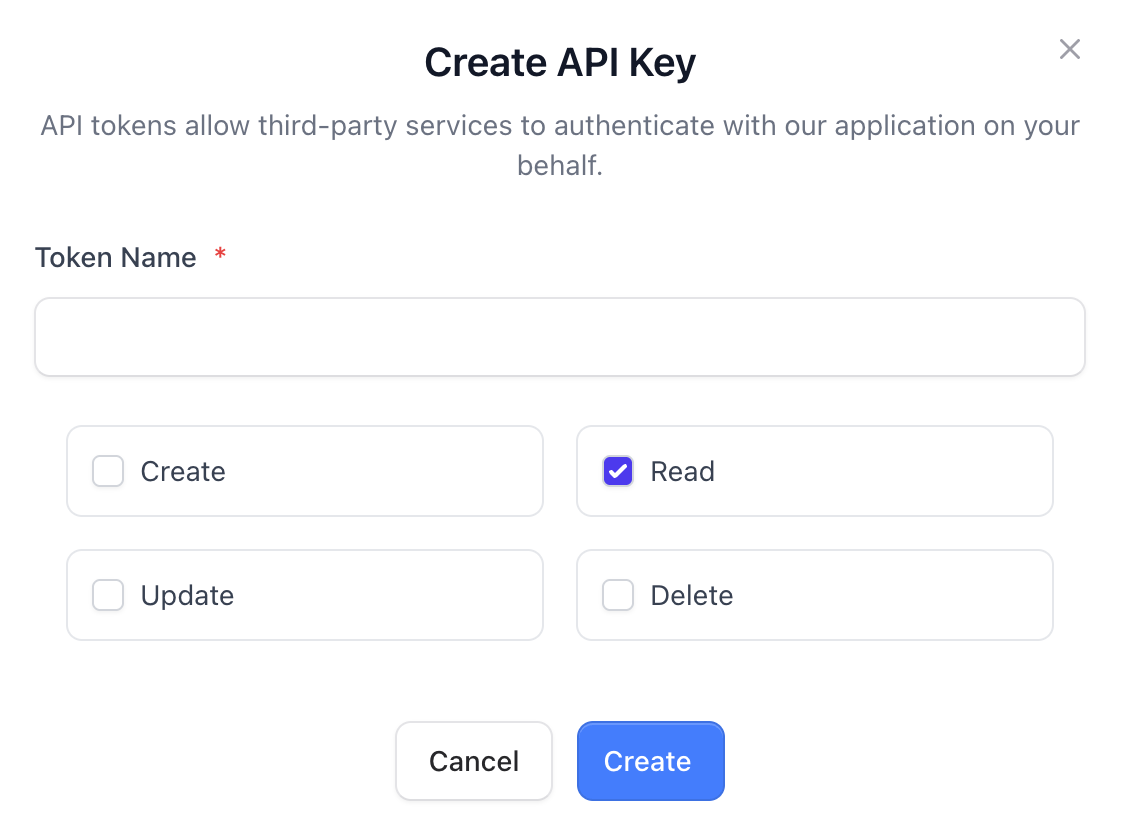
Click Create API Key to open the token creation form.
Token Name *
Enter a name that helps you identify where or by whom the token will be used.
Permissions
Select the permissions you want to assign to the API key:
-
Create
Allows creating new resources (e.g., adding services, creating items, submitting data). -
Read
Grants access to view and retrieve existing data without modifying it. -
Update
Enables editing or modifying existing resources. -
Delete
Allows the removal of resources (use with caution, as these actions may be irreversible).
Choose only the permissions required for your integration to maintain the highest level of security.
Finalize
Click Create to generate your new API token.
Click Cancel if you want to discard the changes.
Once created, the token will be displayed only once, so make sure to store it securely.